MiniMax Audio: AI Voice, Speech and Music Generator
MiniMax Audio AI turns a script into natural speech, clones a voice from a short sample, designs new voices from a description, and writes music. This independent guide explains what MiniMax AI audio actually does, which model to pick, the output formats, what it costs, and how the API works.
OVERVIEW
What is MiniMax Audio?
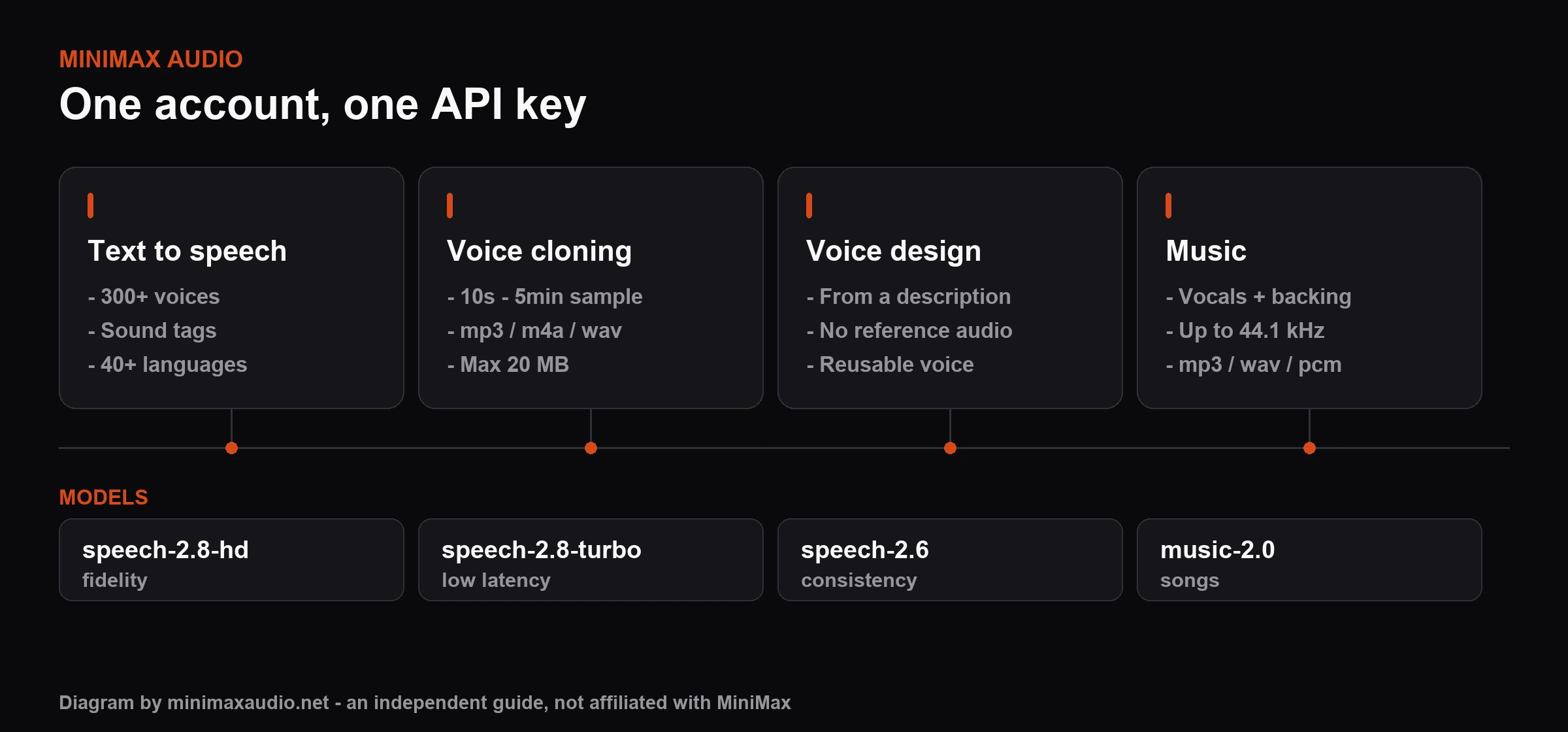
MiniMax Audio is the audio product family from the AI lab MiniMax. One account and one API key cover text to speech, voice cloning, voice design and music generation. The current generation is the Speech 2.8 family, which added sound tags such as (laughs) and (sighs), clones a voice from roughly ten seconds of reference audio, and supports more than 40 languages with native-speaker-validated prosody.
- Text to speech across 40+ languages
- Voice cloning from a ten-second sample
- Voice design written as a description
- Music generation with vocals and backing
CAPABILITIES
What MiniMax Audio can do
Four capabilities, one account, one API key.
SPECS
MiniMax Audio at a glance
The numbers that decide whether it fits your project.
Languages supported
System and cloned voices
Audio needed to clone a voice
HOW TO
How to use MiniMax Audio
Four steps from a blank page to a finished audio file.
MODELS
MiniMax audio model versions
Match the MiniMax audio model to your quality, latency and budget.

The MiniMax audio API and audio formats
The MiniMax audio format you receive depends on how you call it: the synchronous text-to-audio (T2A) endpoint returns mp3, wav or flac, while streaming requests return mp3 only. Music output is mp3, wav or pcm at up to 44.1 kHz and 256 kbps. A single MiniMax audio API key covers speech, cloning, voice design and music.
FIT
Who it suits, and who it does not
An honest read on where this tool wins and where it costs you time.
It fits you if price per character is the constraint
The clearest advantage here is cost at volume. If you are rendering long-form narration, a large library of product descriptions, or a podcast back-catalogue, the per-character rate is what decides your monthly bill, and this sits well below the premium Western vendors. Sound tags help too: being able to write a laugh or a sigh into the script means fewer re-renders chasing a delivery you could not otherwise control.
It fits you if you need many languages without many vendors
Coverage of 40+ languages with prosody checked by native speakers matters most when you are localising one script into a dozen markets. Doing that across several single-language vendors means several contracts, several quality baselines, and several integrations. One endpoint and one key removes that overhead, and a cloned voice can carry across languages rather than being re-cast per market.
It fits you less if you need a large curated voice library
If your work depends on browsing hundreds of professionally directed, rights-cleared character voices and picking the exact right one, the specialist vendors still have deeper catalogues and better discovery tooling. The answer here is usually to design or clone the voice you need rather than to shop for it, which is a different workflow and takes longer the first time.
Check these before you commit
Three things change without announcement and will not appear in any guide fast enough: the exact model IDs available on your account route, the current per-character rate, and the free allowance. Pin a model version in your integration rather than tracking the latest tag, set a spend alert at the account level because all four capabilities draw on one balance, and read the commercial terms for your plan before you publish anything you sell.
MiniMax Audio pricing
MiniMax bills audio pay-as-you-go. Figures below are MiniMax's published list rates, last checked September 2026 - confirm them on MiniMax's own pricing page before you budget.
Still deciding on MiniMax Audio?
Start with what it does and what it costs, then try it on MiniMax's own site.
FAQs
MiniMax Audio questions, answered
The synchronous text-to-audio endpoint returns mp3, wav or flac. Streaming requests return mp3 only. Music generation outputs mp3, wav or pcm, at sample rates up to 44.1 kHz and bitrates up to 256 kbps.
Use speech-2.8-hd when fidelity matters most and the audio is rendered once - audiobooks, narration, ads. Use speech-2.8-turbo when latency matters more than the last few percent of quality, such as voice agents and live assistants. Speech 2.6 remains available when you need output consistent with earlier renders.
MiniMax offers a free tier - reported as 10,000 credits per month, sometimes with additional daily time-limited credits - covering basic features. Free allowances change often, so treat any figure you read as indicative and check your account's current balance on MiniMax's site.
Commercial rights depend on your MiniMax plan and on MiniMax's terms of service, which are the only authoritative source - read them before shipping. Separately, voice cloning carries its own obligation: do not clone a real person's voice without that person's clear, documented consent for the intended use.
Roughly ten seconds is enough for MiniMax's rapid voice cloning. The upload must be mp3, m4a or wav, between 10 seconds and 5 minutes long, and no larger than 20 MB. Cleaner source audio produces a noticeably better clone than a longer noisy one.
MiniMax Audio runs in the browser at minimax.io and through the public API; there is no official desktop application to download. Generated files are downloaded individually as mp3, wav or flac. Treat any third-party 'MiniMax Audio installer' as untrusted.
MiniMax's published pay-as-you-go list rates are $60 per million characters for speech-2.8-turbo and $100 per million characters for speech-2.8-hd, with rapid voice cloning at $1.50 per voice and voice design at $3.00 per voice. These were last checked in September 2026; prices vary by account route, so confirm on MiniMax's pricing page.
The usual comparison set is ElevenLabs, OpenAI's TTS, Google Cloud Text-to-Speech, Azure AI Speech and PlayHT. MiniMax competes mainly on price per character and on sound-tag control; the others differ on voice library size, language coverage, latency and enterprise contracting. Run your own script through two or three before committing.
Newsletter
Join the community
Subscribe to our newsletter for the latest news and updates